
MCP
Build MCP on HuggingFace: Traffic Pattern Analyzer
Introducing the Model Context Protocol (MCP) through building a simple traffic pattern analyzer running on HuggingFace Spaces. This is a Gradio app which also serves as an MCP. The traffic data comes from Google Maps API.
The Model Context Protocol (MCP) is an open-source standardized protocol that enables LLMs to integrate and share data with external sources (Wikipedia). Introduced by Anthropic in November 2024, MCP allows users to build custom servers that connect and communicate directly with LLMs. For Claude, Anthropic’s language model, Claude Code and Claude Desktop provide the MCP support.
App: Simple Traffic Pattern Analyzer
In the Bay Area, CA, traffic during rush hour is notoriously bad, particularly when crossing bridges into San Francisco, such as the Bay Bridge. While Google Maps provides estimated driving times, manually adjusting departure times to identify the best time window is tedious; and it is also not intuitive enough to visualize overall trends. Thus, I created an application that streamlines the process by querying the Google Maps API based on user’s input. The figure below shows a traffic pattern plotted by the app for December 1st 2025, from Evans Hall, UC Berkeley to SFO.
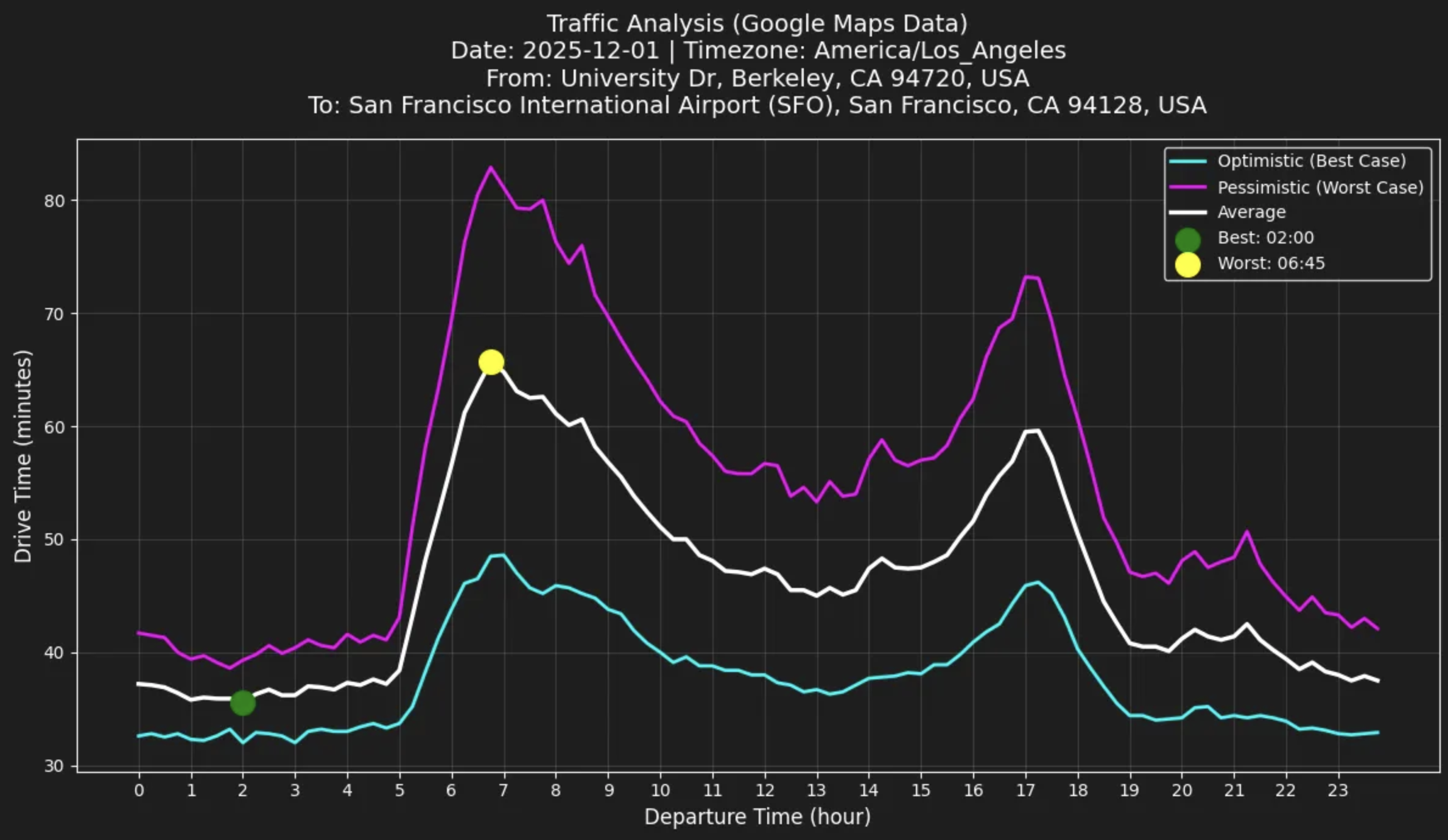
The application is running live on HuggingFace Spaces using the Gradio framework and can be accessed directly below. Please note that initial loading may take a moment. Building upon Gradio’s MCP support, the application can also serve as an MCP server, as demonstrated in the video (section below) using Claude Desktop.
Try your desired origin, destination, and date to analyze traffic patterns!
MCP: Same App on Claude Desktop
The following video demonstrates the above app integrated with Claude Desktop via MCP. MCP being integrated with LLMs, more fine-grained and context-aware analysis of traffic data becomes possible.
Video timeline:
- 0:00 User: Asks about optimal driving from Berkeley to Stanford
- 0:22 Claude: Responds with traffic analysis using MCP
- 0:50 User: Wants to arrive by 4pm
- 1:02 Claude: Refines recommendation based on user's constraint
- 1:11 User: Requests Python code for traffic pattern visualization
- 1:25 Claude: Provides code which follows MCP's direction
- 1:48 User: Requests plot using provided code
- 2:14 Claude: Executes code and generates plot
- 2:22 Final image of generated plot in PNG format